
So you’re ready to break into CNC without the headache. You want a machine that’s actually fun to run, not a project in itself. We’ve dug through specs, user reports, and build quality to find nine hobby-friendly routers that deliver precision without punishing your wallet. The list ranges from compact starter models to robust engravers. But one stands out for sheer versatility.
| Genmitsu CNC Router PROVerXL 4030 V2 | 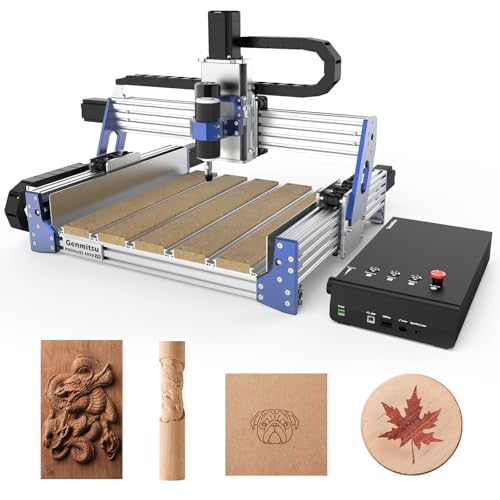 | Best for Large Projects | Working Area (X x Y x Z): 400 x 300 x 110 mm | Spindle Power: 400W | Frame Material: Metal chassis | VIEW LATEST PRICE | Read Our Analysis |
| RATTMMOTOR DIY CNC Router Kit 3 Axis | 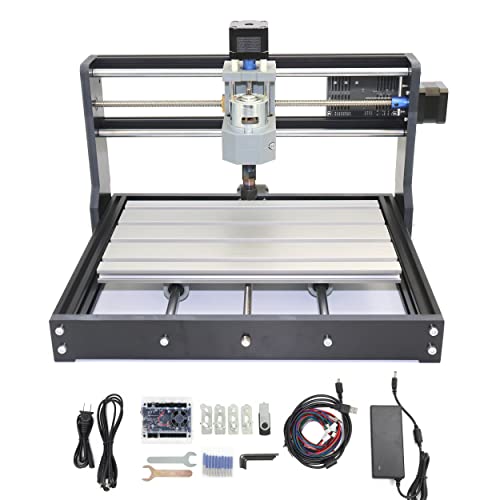 | Budget-Friendly Pick | Working Area (X x Y x Z): 300 x 180 x 45 mm | Spindle Power: 775 motor (10,000 RPM) | Frame Material: Aluminum alloy with injection-molded external structure | VIEW LATEST PRICE | Read Our Analysis |
| FoxAlien Masuter Pro 3-Axis CNC Router |  | Most Popular | Working Area (X x Y x Z): 400 x 400 x 60 mm | Spindle Power: 300W (10,000 RPM) | Frame Material: All-metal aluminum | VIEW LATEST PRICE | Read Our Analysis |
| TTC3018 Pro CNC Router Machine (3-Axis) | Best Value | Working Area (X x Y x Z): 300 x 180 x 40 mm | Spindle Power: 775 motor (7,000-9,000 RPM) | Frame Material: All-metal aluminum | VIEW LATEST PRICE | Read Our Analysis | |
| LUNYEE 3018 PRO MAX CNC Router Machine |  | Most Powerful | Working Area (X x Y x Z): 300 x 180 x 80 mm | Spindle Power: 500W (0-12,000 RPM) | Frame Material: All-metal reinforced aluminum profiles | VIEW LATEST PRICE | Read Our Analysis |
| SainSmart Genmitsu 3018-PROVer V2 CNC Router |  | Best for Beginners | Working Area (X x Y x Z): 300 x 180 x 45 mm | Spindle Power: 10,000 RPM (24V) | Frame Material: Fixed aluminum structure | VIEW LATEST PRICE | Read Our Analysis |
| LUNYEE 3020 Nova CNC Router Machine |  | Professional Grade | Working Area (X x Y x Z): 300 x 200 x 80 mm | Spindle Power: 800W (6,000-30,000 RPM) | Frame Material: All-metal frame | VIEW LATEST PRICE | Read Our Analysis |
| Twotrees TTC450 Pro CNC Router Machine |  | Most Versatile | Working Area (X x Y x Z): 460 x 460 x 80 mm | Spindle Power: 775 brushed motor | Frame Material: Aluminum alloy and stainless steel | VIEW LATEST PRICE | Read Our Analysis |
| Genmitsu CNC Router 4040-PRO for Metal Engraving |  | Best for Metal Engraving | Working Area (X x Y x Z): 400 x 400 x 78 mm | Spindle Power: 300W (compatible) | Frame Material: Aluminum and acrylic body with steel HSS frame | VIEW LATEST PRICE | Read Our Analysis |
More Details on Our Top Picks
Genmitsu CNC Router PROVerXL 4030 V2
If you’re scaling up your projects, the Genmitsu CNC Router PROVerXL 4030 V2 is a solid fit for larger workpieces. Its 400W spindle handles wood, plastics, and even soft metals, while closed-loop NEMA 23 motors keep precision tight. You get a 400mm x 300mm x 110mm work area, and with a max travel speed of 5000 mm/min, you’ll finish jobs faster. The 1204 ball screws and improved Z-axis boost stability, plus eccentric nut adjustment reduces noise and step loss. Setup is easy via a GRBL USB control board, and the T-slot table secures irregular materials. It’s low maintenance, backed by a one-year warranty, and rated 4.1 stars.
- Working Area (X x Y x Z):400 x 300 x 110 mm
- Spindle Power:400W
- Frame Material:Metal chassis
- Control System:GRBL control board, USB
- Weight:Not specified
- Compatible Materials:Wood, plastics, soft metals, acrylic, PCBs, MDF
- Additional Feature:Closed-loop stepper motors
- Additional Feature:Eccentric nut adjustment
- Additional Feature:1204 ball screws
RATTMMOTOR DIY CNC Router Kit 3 Axis
RATTMMOTOR’s kit is your budget-friendly pick for an entry-level machine that works. It’s a compact 3 axis CNC router, with a 300x180x45mm work area, perfect for engraving wood, plastic, acrylic, PCBs, and even soft metals like copper or aluminum. You’ll love the aluminum alloy frame and stainless steel screw rods for durability.
Assembly is straightforward, thanks to the paper manual and USB files. The GRBL control board supports emergency stops and axis limits, making it beginner friendly. It’s powered by a 24V spindle that hits 10,000 RPM, with a silent cooling fan to keep noise down. But don’t push it: harder materials like glass or steel are off limits. That’s fine for hobbyists just starting out.
- Working Area (X x Y x Z):300 x 180 x 45 mm
- Spindle Power:775 motor (10,000 RPM)
- Frame Material:Aluminum alloy with injection-molded external structure
- Control System:Updated GRBL control board
- Weight:~6.64 kg
- Compatible Materials:Wood, plastic, acrylic, PVC, PCBs, carbon fiber, copper, aluminum (not hard metals/glass)
- Additional Feature:Silent cooling fan
- Additional Feature:Compact desk-friendly design
- Additional Feature:Offline controller recognition
FoxAlien Masuter Pro 3-Axis CNC Router
The FoxAlien Masuter Pro is the most popular CNC router for hobbyists who want a solid metal build without breaking the bank. You get an all-aluminum frame that keeps vibrations low, plus a linear rail Z-axis for cleaner cuts. Assembly takes just 10 to 15 minutes, thanks to pre-wired components and a clear manual. Your work area measures 15.75 inches square, with a 2.36 inch depth. Need more space? Grab the optional Y-axis extension kit. You can swap spindles easily using the included 52mm and 65mm clamps, or upgrade to a 1.5KW unit. It weighs 13 kilograms, runs at 10,000 RPM, and carries a 4.1 star rating from over 600 users.
- Working Area (X x Y x Z):400 x 400 x 60 mm
- Spindle Power:300W (10,000 RPM)
- Frame Material:All-metal aluminum
- Control System:GRBL-based
- Weight:~13 kg
- Compatible Materials:Wood, various (supports custom spindles for broader materials)
- Additional Feature:Dual spindle clamp sizes
- Additional Feature:Y-axis extension kit optional
- Additional Feature:Pre-assembled main components
TTC3018 Pro CNC Router Machine (3-Axis)
For budget minded makers wanting a solid introduction to CNC without spending big, the TTC3018 Pro offers impressive value. You get a compact, all-metal machine with a working area of 300mm by 180mm by 40mm, perfect for wood, acrylic, and even lightweight aluminum. Its 3-axis upgrade includes T8 lead screws that beat backlash, delivering 0.1mm precision. You assemble 40+ components yourself, learning XYZ motion firsthand. The 775 spindle spins at 7000 to 9000 RPM, and it connects via USB to your PC no WiFi headaches here. Plus, you get 10 cutters and an ER11 collet included. It’s desk friendly at just 15 pounds, rated 4.4 stars from 245 reviews.
- Working Area (X x Y x Z):300 x 180 x 40 mm
- Spindle Power:775 motor (7,000-9,000 RPM)
- Frame Material:All-metal aluminum
- Control System:32-bit GRBL control board, USB
- Weight:~6.8 kg (15 pounds)
- Compatible Materials:Wood, acrylic, MDF, nylon, lightweight aluminum, brass
- Additional Feature:Backlash-eliminating lead screws
- Additional Feature:40+ components for assembly
- Additional Feature:ER11 collet range 0.5-7mm
LUNYEE 3018 PRO MAX CNC Router Machine
You’re after the most power in a compact desktop CNC? The LUNYEE 3018 PRO MAX delivers with a 500W all-metal build that laughs at plastic frames. Its reinforced aluminum profile withstands heavy loads, and the 12mm optical axis keeps linear motion precise. You get an 80mm Z-axis stroke for deeper cuts, plus a spindle screaming from 0 to 12,000 RPM. That means you can carve wood, acrylic, aluminum, and copper without breaking a sweat. Six limit switches and an emergency stop button protect you. And manual handwheels on the XYZ axes let you zero in on the origin quickly. The GRBL offline control works seamlessly, and the included 4G USB drive has pre-installed software, so you’re ready to go in minutes. Dimensions sit at 7.09 by 11.81 inches, weighing about 13 kilograms. It’s a sturdy workhorse with a 4 out of 5 star rating across 235 reviews, backed by a 30 day return policy.
- Working Area (X x Y x Z):300 x 180 x 80 mm
- Spindle Power:500W (0-12,000 RPM)
- Frame Material:All-metal reinforced aluminum profiles
- Control System:GRBL software, offline control
- Weight:~13 kg
- Compatible Materials:Wood, acrylic, MDF, plastic, aluminum, copper
- Additional Feature:Six limit switches
- Additional Feature:Manual handwheels on XYZ
- Additional Feature:Pre-installed software on USB
SainSmart Genmitsu 3018-PROVer V2 CNC Router
SainSmart’s 3018-PROVer V2 is your ideal launchpad into CNC. You get a fixed aluminum structure that assembles in about an hour, so you’re cutting material fast. Engrave wood, plastic, acrylic, PVC, PCB, carbon fiber, density board, even soft metals like copper and aluminum. It features limit switches and an E-stop for safety, plus you can add extension kits or a more powerful spindle later. The 24V system spins at 10,000 RPM, and you use CAD/CAM tools like Easel or Fusion360 to design. With a 4.2-star average from over 1,284 reviews, this router delivers real results.
- Working Area (X x Y x Z):300 x 180 x 45 mm
- Spindle Power:10,000 RPM (24V)
- Frame Material:Fixed aluminum structure
- Control System:GRBL-based, CAD/CAM software compatible
- Weight:~9.7 kg (342.4 oz)
- Compatible Materials:Wood, plastic, acrylic, PVC, PCB, carbon fiber, density board, copper, aluminum
- Additional Feature:Pre-assembled gantry frame
- Additional Feature:Limit switches and E-stop
- Additional Feature:Offline control module support
LUNYEE 3020 Nova CNC Router Machine
The LUNYEE 3020 Nova delivers professional grade precision right out of the box. You get industrial 1204 ball screws and HG-15 linear guides on every axis, eliminating that annoying backlash for accuracy within ±0.05mm. Its 800W all metal spindle spins from 6,000 to 30,000 RPM, with six constant torque settings. You can cut aluminum, brass, acrylics, PCBs, and leather. The machine comes fully assembled; you only need to install the Z axis module and plug into 48V power. It’s compatible with UGS, Fusion 360, and Easel. Plus, it scores 4.1 stars on Amazon.
- Working Area (X x Y x Z):300 x 200 x 80 mm
- Spindle Power:800W (6,000-30,000 RPM)
- Frame Material:All-metal frame
- Control System:GRBL firmware (UGS, Fusion 360, Easel, Candle)
- Weight:~19.2 kg
- Compatible Materials:Aluminum, brass, woods, acrylics, MDF, plastics, PCBs, leather
- Additional Feature:HG-15 linear guides
- Additional Feature:Six adjustable spindle speeds
- Additional Feature:Fully assembled with pre-wired parts
Twotrees TTC450 Pro CNC Router Machine
Twotrees TTC450 Pro is what you grab for the most versatile projects. Its all-metal build gives you rock-solid stability, while the 3.5-inch IPS touch screen makes adjustments dead simple. You get a massive 460 x 460 mm work area, perfect for furniture panels or batch production. Plus, the Z-axis precision hits 0.0025 mm, so multi-layer engraving or intricate relief work becomes child’s play.
- Materials you can cut: wood, acrylic, carbon fiber, aluminum, copper, even stainless steel.
- Upgrade options: Add a 4th-axis rotary or laser module via the control box ports.
- Software compatibility: Runs ArtCam, Fusion 360, Easel, Carveco Maker across Windows, macOS, Linux.
- What’s included: 10 cutting tools, 6 clamping plates, test materials, and a 775 brushed spindle motor.
It’s CE, FCC, and RoHS certified, too. You’ll feel confident diving into any project.
- Working Area (X x Y x Z):460 x 460 x 80 mm
- Spindle Power:775 brushed motor
- Frame Material:Aluminum alloy and stainless steel
- Control System:Open-source GRBL, touch screen
- Weight:~20.5 kg
- Compatible Materials:Wood, acrylic, carbon fiber, aluminum, copper, stainless steel
- Additional Feature:3.5-inch IPS touch screen
- Additional Feature:NEMA 57 stepper motor
- Additional Feature:Ports for 4th-axis rotation
Genmitsu CNC Router 4040-PRO for Metal Engraving
Genmitsu’s 4040-PRO handles metal engraving with reliable precision. You get a 15.7” x 15.7” x 3.1” working area, perfect for aluminum and acrylic projects. Its steel HSS frame with dual 16mm linear tubes keeps everything rigid, so your cuts stay accurate.
Upgraded features you’ll love:
- Emergency stop and home buttons in a dustproof metal control box.
- A Toshiba TB6S109 driver with a 32-bit chip for smooth operation.
- Adjustable spindle mounts from 42mm to 69mm, fitting your 300W spindle.
Assembly takes about 15 minutes thanks to pre-built parts. Add the 4th axis for 3D carving or the Wi-Fi module for mobile control. It’s a solid, expandable machine for serious hobbyists!
- Working Area (X x Y x Z):400 x 400 x 78 mm
- Spindle Power:300W (compatible)
- Frame Material:Aluminum and acrylic body with steel HSS frame
- Control System:GRBL control, TB6S109 driver
- Weight:~20.84 kg
- Compatible Materials:Metal, acrylic (focused on metal engraving)
- Additional Feature:Steel HSS frame structure
- Additional Feature:Replaceable MDF spoilboard panels
- Additional Feature:Toshiba TB6S109 driver
Factors to Consider When Choosing a CNC Machine for Hobby
Before you buy, you’ll want to zero in on five key factors: your budget and the value you’re getting, the work area size you actually need, and what materials you’ll cut most often. Don’t overlook spindle power, since a 300W motor struggles with hardwood but a 1.5kW one handles it easily, and the build construction matters too, as aluminum frames stay rigid while plastic ones flex. These points decide if your machine frustrates you or fuels your projects, so let’s break each one down.
Budget and Value
When you’re choosing a CNC machine as a hobbyist, budget and value go hand in hand, so start by weighing the upfront cost against what you actually get for your money. Don’t just chase the cheapest price. Look for the best balance of affordability and performance, especially in precision, material compatibility, and software support. A low-cost machine might save you cash now, but a pricier one with better build quality and durability often justifies itself over years of use.
Consider long-term value too. Check the availability and cost of replacement parts, accessories, and upgrades. A higher priced machine usually offers better results and more cost effective operation down the road, making it a smarter investment than a bargain that leaves you frustrated. In short, spend wisely for what you’ll truly enjoy using!
Work Area Size
One key factor is the work area size, which determines the maximum dimensions of material you can process in a single session. A larger work area lets you tackle bigger projects, but it’ll also increase the machine’s footprint and your budget. Small areas shine for detailed, miniature creations. So, think about your typical project size. Do you mostly make small signs or intricate jewelry? A compact 12 x 12 inch bed might be perfect. Want to build large wall art or furniture components? You’ll need a 24 x 36 inch or bigger space. Align the dimensions with your goals. You don’t want to spend on a massive machine if you’ll only use a fraction of its capacity. Or worse, buy something too small and feel cramped! Measure your workspace first. Then choose a work area that balances capability with your available room. It’s that simple.
Material Compatibility
So you’ve matched your dream machine to your workspace size. Now, let’s talk about what it can actually cut. You’ll want a CNC that supports a wide range of materials: wood, plastics, soft metals like aluminum, and acrylic. That’s your project playground. Check the specs for maximum spindle speed and power. That tells you if it can handle thicker or denser materials without bogging down. Also, verify its cutting and engraving capabilities on various substrates. Don’t overlook the tool holder and collet sizes. They must accommodate the cutters you’ll use for your specific materials. A machine that’s flexible with material choices keeps your hobby from feeling limited. So, pick one that grows with your ideas.
Spindle Power
Your machine’s spindle is the heart of its cutting ability, and understanding spindle power helps you avoid frustration down the road. Higher wattage like 500W or 300W lets you rip through denser materials such as metals and thick plastics without bogging down. But don’t overlook max RPM: higher speeds deliver smoother surface finishes and sharper detail in engraving. You’ll want variable speed control too. That’s your ticket to versatility, letting you dial in the perfect pace for everything from softwoods to hard acrylics. Without enough power, you’re stuck with light projects and shallow passes. So match the spindle to your ambition. Need precise, repeatable cuts on tougher stuff? Go bigger. For lightweight hobby work, a 300W unit still handles plenty. Just don’t shortchange yourself: a weak spindle kills consistency fast.
Build Construction
Two factors determine whether a hobby CNC will hold up over years of use: the frame material and the motion components. Go for an all-metal frame, ideally aluminum or steel. Plastic or composite structures flex too much, introducing vibrations that ruin your detail work. You want rigidity that minimizes those tiny, unwanted movements.
Now, look at the motion system. Linear rails and ball screws are your best bet, offering smooth, precise movement without slop. Reinforced joints on the frame also prevent flexing during aggressive cuts. Proper assembly and calibration are non-negotiable here; even a great machine loses accuracy if you don’t square it up. So, prioritize a solid, metal build with quality linear guides and ball screws. Your machine’s accuracy and your project’s success depend on it.
Control Software
Once you’ve locked in a rigid metal frame and smooth motion components, you need software that actually lets you put that hardware to work. First, check compatibility with popular CAD/CAM tools like Fusion360, Easel, or Candle. These let you design parts and generate GCode instructions. Your control software must also support the materials you’ll cut, whether wood, plastics, or metals. Look for features that keep you safe: real time machine monitoring, limit switch integration, and an emergency stop function. And don’t overlook operating system support. Windows, macOS, or Linux compatibility broadens your options. For workflow flexibility, offline control via USB or SD card is a game changer. It frees you from a constant computer tether. That’s the kind of freedom that makes a hobby truly enjoyable.
Ease of Setup
Why struggle with hours of assembly when you could be making chips in under 15 minutes? You’ll want a machine that arrives with pre-assembled main components and straightforward wiring. No wrestling with a rat’s nest of cables or deciphering cryptic screws. Look for all-inclusive assembly kits with clear manuals and even video tutorials, because honestly, you didn’t sign up to be an engineer, you’re here to make things. Compact and lightweight models are a godsend here, as they’re far easier to position than hulking industrial beasts. Plus, a user-friendly interface, whether a touch screen or a simplified control panel, cuts setup complexity dramatically. And don’t overlook machines advertised for quick installation, some CNC routers brag about a 15 minute setup. That’s your sweet spot. So keep it simple, keep it fast, and keep yourself making.