
You’ve got an Arduino ready to move, but without the right stepper driver, your motors will chatter instead of glide. That’s where these four top picks come in. They handle current, microstepping, and safety so you get smooth, precise motion. But which one truly fits your build? Let’s break down their strengths so you don’t waste time guessing.
| DRV8825 Stepper Motor Driver for Arduino (2 Sets) |  | Best Value Bundle | Current Rating: Adjustable current limiting (max not specified) | Microstepping Support: High-precision microstepping (details not specified) | Input Voltage Range: Not specified | VIEW LATEST PRICE | Read Our Analysis |
| Longruner GRBL CNC Shield Board Kit with Stepper Motors | 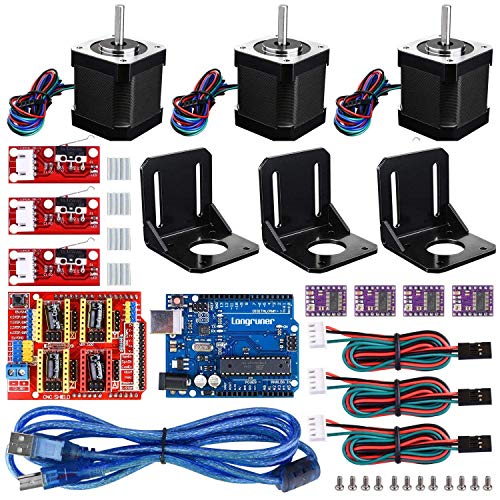 | Full Starter Kit | Current Rating: Up to 2.5A with heatsinks | Microstepping Support: Supported via DRV8825/A4988 drivers | Input Voltage Range: 12V and 36V options | VIEW LATEST PRICE | Read Our Analysis |
| TB6600 Stepper Motor Driver 5A CNC Controller |  | High-Power Workhorse | Current Rating: Adjustable via DIP, peak up to 4A | Microstepping Support: 7 modes: 1, 2/A, 2/B, 4, 8, 16, 32 microsteps | Input Voltage Range: 9V to 40V DC | VIEW LATEST PRICE | Read Our Analysis |
| HiLetgo A4988 Stepper Motor Driver Module (5pcs) |  | Budget-Friendly Pick | Current Rating: Up to ±1.2A (recommended heatsink) | Microstepping Support: 5 resolutions: full, half, quarter, eighth, sixteenth | Input Voltage Range: Up to 35V | VIEW LATEST PRICE | Read Our Analysis |
More Details on Our Top Picks
DRV8825 Stepper Motor Driver for Arduino (2 Sets)
You get a solid value bundle with the DRV8825 stepper motor driver set from DIYables. It includes two driver modules and two matching expansion boards, perfect for multi-axis CNC, 3D printing, or robotics. Compatible with Arduino, ESP32, ESP8266, and Raspberry Pi, you achieve precise motor control. The expansion boards feature clear pin layouts and organized connectors, reducing wiring clutter for rapid prototyping. Built-in adjustable current limiting protects your motors and drivers. High-quality components ensure stable voltage regulation. Plus, the straightforward interfaces simplify integration for makers, educators, and developers. You’ll appreciate the value for multi-project setups.
- Current Rating:Adjustable current limiting (max not specified)
- Microstepping Support:High-precision microstepping (details not specified)
- Input Voltage Range:Not specified
- Compatible Platforms:Arduino, ESP32, ESP8266, Raspberry Pi
- Protection Features:Built-in adjustable current limiting
- Package Quantity:2 driver modules + 2 expansion boards (4 units total)
- Additional Feature:Includes expansion boards
- Additional Feature:Adjustable current limiting
- Additional Feature:Weight: 0.04 kg
Longruner GRBL CNC Shield Board Kit with Stepper Motors
The Longruner GRBL CNC Shield Board Kit is your full starter kit. It bundles the CNC shield V3.0, RAMPS 1.4, DRV8825 drivers, and a Nema17 motor. You get mechanical endstops for precise motion control. The DRV8825 supports up to 2.5A with aluminum heatsinks, so you can run 12V or 36V systems. Rated 4.5 stars from 226 reviews, it’s built with premium materials for durability. But remember, it’s not smart home compatible. And if you hit a snag, their support replies within 24 hours. Perfect for your first CNC or 3D printer project!
- Current Rating:Up to 2.5A with heatsinks
- Microstepping Support:Supported via DRV8825/A4988 drivers
- Input Voltage Range:12V and 36V options
- Compatible Platforms:Arduino IDE, GRBL 0.9
- Protection Features:Not specified
- Package Quantity:1 kit (includes board, drivers, motor, endstops)
- Additional Feature:Includes Nema17 stepper motor
- Additional Feature:Aluminum heatsinks included
- Additional Feature:380 grams total weight
TB6600 Stepper Motor Driver 5A CNC Controller
Want a stepper driver that can really haul? You’re looking at the TB6600, a three-piece set built for CNC muscle. Each unit handles NEMA 17, 42, or 57 motors, and it’s dead simple to hook up with any 5V microcontroller like Arduino. You get 8 current options and 7 microstepping modes, from 1 to 32, all adjustable via six DIP switches. That’s precision without the fuss.
Safety’s no afterthought. Overheat protection kicks in with a big heat sink and automatic semi-flow cooling. Plus you’ve got overcurrent, reverse polarity, and short circuit guards. Dimensions are 96 x 71 x 37 mm per driver. It runs on 9V to 40V DC. Just keep it between -10°C and 45°C.
- Current Rating:Adjustable via DIP, peak up to 4A
- Microstepping Support:7 modes: 1, 2/A, 2/B, 4, 8, 16, 32 microsteps
- Input Voltage Range:9V to 40V DC
- Compatible Platforms:Arduino and 5V digital pulse microcontrollers
- Protection Features:Overheat, overcurrent, reverse polarity, short circuit protection
- Package Quantity:3 driver units
- Additional Feature:DIP switch current/microstep control
- Additional Feature:Optocoupler isolation for signals
- Additional Feature:Overheat/overcurrent/short protection
HiLetgo A4988 Stepper Motor Driver Module (5pcs)
Need a pack of five reliable stepper drivers for your next Arduino build? Then grab this HiLetgo A4988 bundle. You get five modules, each with a heat sink, ready for your 3D printer, CNC machine, or engraver. You control motion with simple step and direction signals. Plus, you pick your resolution: full, half, quarter, eighth, or sixteenth step. That’s serious precision for fine movements.
Each driver handles up to 35V and 1.2A. Adjust current with the tiny potentiometer. It automatically manages current decay, so you get smooth motion without extra tweaking. It also protects against over-temperature and under-voltage. These drivers work with RAMPS, Ultimaker, and similar boards. They’re built with high-precision SMT assembly for stable, reliable performance. You’re getting a solid value.
- Current Rating:Up to ±1.2A (recommended heatsink)
- Microstepping Support:5 resolutions: full, half, quarter, eighth, sixteenth
- Input Voltage Range:Up to 35V
- Compatible Platforms:Arduino, Reprap, RAMPS, 3D printers, CNC
- Protection Features:Over-temperature shutdown, under-voltage lockout, crossover-current protection
- Package Quantity:5 driver modules with heatsinks
- Additional Feature:Intelligent chopping current control
- Additional Feature:Five selectable step resolutions
- Additional Feature:Over-temperature thermal shutdown
Factors to Consider When Choosing a Stepper Driver for Arduino
Before you pick a driver, you need to think about a few key factors that can make or break your project. Current limiting keeps your motor from frying, while microstepping modes give you smoother movement and better precision. Don’t overlook voltage compatibility, heat management, and signal isolation; they’re all essential for reliable performance, so weigh each one carefully.
Current Limiting
Because you’re dialing in performance and safety, current limiting is perhaps the most critical feature on any stepper driver. Proper current control prevents motor overheating and damage by capping the maximum power it receives. You’ll adjust this setting based on your motor’s rated current, typically using a potentiometer or DIP switches. Set it too high, and you risk driver overheating, shortening your system’s lifespan. Too low, and you’ll suffer missed steps with insufficient torque. Get it right, and your stepper runs cool and reliably. Don’t skip careful calibration here: match the driver’s adjustable current limit precisely to your motor’s specifications. It’s a quick setup that pays off in smooth, dependable motion you can count on.
Microstepping Modes
When you’re dialing in your motion system, microstepping modes are one of the first things to get right. These modes control how many steps your motor takes per full revolution, giving you finer resolution and smoother movement. You’ll choose from common options like full step, half step, quarter step, eighth step, or sixteenth step, each boosting precision and reducing vibration and noise. But here’s the trade-off: higher microstepping settings cut torque and increase driver complexity, so you need compatible hardware and firmware to interpret those signals accurately. For precise applications, your mode directly impacts positional accuracy and speed stability. A sixteenth step gives you silky motion but less holding power, while full step offers raw torque at the cost of jitter. Pick based on your project’s needs, not just what sounds cool!
Voltage Compatibility
Voltage compatibility isn’t just a technical checkbox; it’s the foundation of a reliable stepper motor setup. You’ll need to match your driver’s input range with your power supply. Most Arduinos play nicely with common voltages like 12V or 24V, but some drivers handle up to 40V DC for higher torque. Don’t forget to check your motor’s voltage requirements too. Mismatching can fry components or cause poor performance. If you’re juggling multiple motor types, grab a driver with adjustable voltage or current settings. And pay attention to your control system’s logic voltage. A driver that expects 5V logic might not talk to a 3.3V Arduino properly. So pick a driver that bridges your supply voltage, motor specs, and logic levels smoothly. That way, you’re building a setup that actually works without the magic smoke.
Heat Management
What about heat? It’s a silent killer of stepper drivers. Overheating triggers thermal shutdown, reduces current output, or causes missed steps and outright failure. You can’t ignore thermal management if you want reliable motion.
Heat sinks are your first line of defense. Add active cooling fans for high loads. Guarantee adequate ventilation around the driver module. Microstepping and high current settings generate extra heat, so you’ll need more robust cooling for those setups. Match the driver’s thermal ratings to your workload demands to avoid damage and extend its lifespan.
For example, running a driver at 2A with 1/16 microstepping without a fan? That’s asking for trouble. A small 40mm fan and a proper heatsink can drop operating temps by 20°C or more. Prioritize cooling, and your driver will reward you with smooth, consistent performance.
Signal Isolation
Signal isolation might not sound as flashy as torque or microstepping, but it’s an essential shield for your Arduino and stepper driver setup. It blocks interference from noisy environments, so your motor moves accurately without glitches. Optocouplers are the heart of this feature: they electrically separate your control signals from high-voltage power circuits. This separation protects your microcontroller from voltage surges that could fry it. You’ll want a driver with a high isolation voltage rating, often listed in volts, like 1500V or more. That rating tells you the maximum safe barrier across the isolation. Without it, you risk erratic steps or damaged hardware. So, prioritize boards that clearly state this spec. Your Arduino will thank you, and your motion stays smooth, even in a workshop full of motors and power supplies!