
Remember the first time you tried to assemble flat-pack furniture, only to find a vital screw missing? Setting up a CNC router shouldn’t feel the same. You deserve a machine that gets you straight to the satisfying hum of carving wood, not hunting for wrenches. We have found eight models that finally deliver that promise.
| Genmitsu PROVerXL 4030S CNC Router Machine | 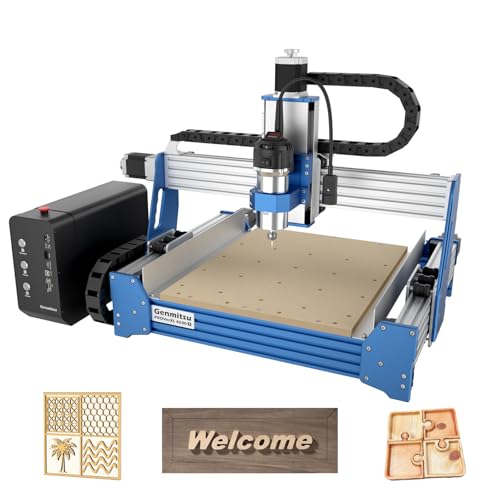 | Best for Professionals | Working Area (X×Y×Z): 400×300×130 mm | Spindle Power: 710W | Control Software Compatibility: Genmitsu App (WiFi module optional) | VIEW LATEST PRICE | Read Our Analysis |
| TTC3018 Pro CNC Router Machine (Desktop Engraver) | Best Budget Pick | Working Area (X×Y×Z): 300×180×40 mm | Spindle Power: 775 motor (approx. 100-200W) | Control Software Compatibility: GRBL (Candle, ArtCam, Fusion360) | VIEW LATEST PRICE | Read Our Analysis | |
| Twotrees TTC450 Pro CNC Router Machine |  | Best for Beginners | Working Area (X×Y×Z): 460×460×80 mm | Spindle Power: 775 brushed spindle (approx. 100-200W) | Control Software Compatibility: GRBL (ArtCam, Fusion 360, Easel, Carveco Maker) | VIEW LATEST PRICE | Read Our Analysis |
| FoxAlien XE-Ultra 8080 CNC Router Machine |  | Best Large Format | Working Area (X×Y×Z): 838×838×120 mm | Spindle Power: Open ecosystem (spindle not included) | Control Software Compatibility: GRBL (smart 32-bit control box) | VIEW LATEST PRICE | Read Our Analysis |
| CNC Router Machine Desktop 3 Axis (4040 PRO) |  | Best Value | Working Area (X×Y×Z): 400×400×? mm | Spindle Power: 500W | Control Software Compatibility: GRBL (Candle via USB) | VIEW LATEST PRICE | Read Our Analysis |
| Genmitsu CNC Router 4040-PRO for Metal Engraving |  | Best for Metal | Working Area (X×Y×Z): 400×400×79 mm | Spindle Power: 300W | Control Software Compatibility: GRBL (WiFi module optional) | VIEW LATEST PRICE | Read Our Analysis |
| FoxAlien Masuter Pro 3-Axis CNC Router |  | Best for Customization | Working Area (X×Y×Z): 400×400×60 mm | Spindle Power: 300W | Control Software Compatibility: GRBL (Candle) | VIEW LATEST PRICE | Read Our Analysis |
| Lunyee 3018 Pro Ultra CNC Router Machine |  | Best for Stability | Working Area (X×Y×Z): 300×180×80 mm | Spindle Power: 500W | Control Software Compatibility: GRBL (offline control) | VIEW LATEST PRICE | Read Our Analysis |
More Details on Our Top Picks
Genmitsu PROVerXL 4030S CNC Router Machine
The Genmitsu PROVerXL 4030S is built for serious work. You get a robust 710W spindle that cuts through aluminum, acrylic, and wood with ease. Its 130mm Z-height lets you tackle taller projects effortlessly. Setup takes about 20 minutes thanks to its modular design. You can monitor operations remotely via the Genmitsu App. The 32-bit microcontroller guarantees smooth, accurate motion control. Expect repeatable positioning within ±0.05 mm. Plus, it runs quietly under 65 dB. Perfect for your professional workflow.
- Working Area (X×Y×Z):400×300×130 mm
- Spindle Power:710W
- Control Software Compatibility:Genmitsu App (WiFi module optional)
- Frame Material:Aluminum
- Weight:33 kg
- Supported Materials:Wood, metal, acrylic, aluminum
- Additional Feature:Wireless app remote control
- Additional Feature:Up to 5,000 mm/min drive speed
- Additional Feature:710W high-power spindle
TTC3018 Pro CNC Router Machine (Desktop Engraver)
You get a budget-friendly desktop engraver that doesn’t feel cheap. Its all-metal Z-axis and T8 lead screws deliver 0.1mm precision, so you won’t deal with shaking on wood, acrylic, or even lightweight aluminum. The 775 spindle runs from 7,000 to 9,000 RPM, perfect for small business runs.
The 300mm x 180mm x 40mm work area fits right on your desk, and assembly teaches you XYZ motion. No extra purchases needed, it includes 10 cutters and an ER11 collet.
Plug it into Windows or Mac via USB, and you’ll run GRBL, ArtCam, or Fusion360 with zero fuss. You’re creating in minutes, not hours.
- Working Area (X×Y×Z):300×180×40 mm
- Spindle Power:775 motor (approx. 100-200W)
- Control Software Compatibility:GRBL (Candle, ArtCam, Fusion360)
- Frame Material:Aluminum (all-metal)
- Weight:6.8 kg (15 pounds)
- Supported Materials:Wood, acrylic, MDF, nylon, lightweight aluminum, brass
- Additional Feature:T8 backlash-eliminating lead screws
- Additional Feature:40+ components for assembly learning
- Additional Feature:All-metal Z-axis upgrade
Twotrees TTC450 Pro CNC Router Machine
Begin with the Twotrees TTC450 Pro if you’re new to CNC and want a machine that grows with you. This all-metal beast boasts a 3.5-inch touch screen, making setup a breeze. You’ll appreciate its dual limit switches for precise positioning and a work area of 460 x 460 x 80 mm, perfect for signs or furniture panels.
Its high-precision Z-axis, driven by a NEMA 57 motor, achieves 0.0025 mm accuracy. And you can upgrade easily: add a 4th axis, laser module, or 500W spindle. It comes with 10 cutting tools, clamping plates, and test materials. CE, FCC, RoHS certified. 4.4 stars out of 245 reviews. A solid choice for your workshop.
- Working Area (X×Y×Z):460×460×80 mm
- Spindle Power:775 brushed spindle (approx. 100-200W)
- Control Software Compatibility:GRBL (ArtCam, Fusion 360, Easel, Carveco Maker)
- Frame Material:Aluminum alloy and stainless steel
- Weight:20.5 kg
- Supported Materials:Wood, acrylic, carbon fiber, aluminum, copper, stainless steel
- Additional Feature:3.5-inch IPS touch screen
- Additional Feature:NEMA 57 stepper motor on Z-axis
- Additional Feature:Ports for 4th-axis/laser upgrade
FoxAlien XE-Ultra 8080 CNC Router Machine
For serious DIYers and small shop owners looking to graduate from hobby grade machines without jumping to industrial pricing, the FoxAlien XE-Ultra 8080 delivers large format capability on a benchtop. You get a massive 33x33x4.72 inch workspace with a 5.3 inch pass height, perfect for big wood or aluminum projects. Its industrial grade 46x80mm aluminum frame and 16mm ball screws on XY axes keep things rigid at speeds up to 5,000mm/min. You can swap spindles easily using the included 65mm clamp. Plus, the smart 32 bit control box offers real time diagnostics and a reserved port for a future 4th axis.
- Working Area (X×Y×Z):838×838×120 mm
- Spindle Power:Open ecosystem (spindle not included)
- Control Software Compatibility:GRBL (smart 32-bit control box)
- Frame Material:Aluminum (46×80mm frame)
- Weight:40 kg
- Supported Materials:Woodworking, aluminum, acrylic, carbon fiber
- Additional Feature:16mm ball screws on XY axes
- Additional Feature:Industrial inductive limit switches
- Additional Feature:Open spindle ecosystem
CNC Router Machine Desktop 3 Axis (4040 PRO)
V-wheel and linear rails keep this desktop CNC stable for metal or wood. You’re getting a 500W spindle strong enough for serious work, yet it’s just 19.12 kilograms. The X/Y axes use 2GT belts, while the Z axis runs a TR8-2T screw for precise depth control. GRBL control software lets you preview 3D models, set origins, and activate axes in real time.
Your toolkit includes:
- Automatic Z-probe for effortless tool setting
- Emergency stop and limit switches for safety
- Pre-wired parts for quick assembly
- Upgradable laser attachment
With Amazon’s 30-day return policy and a 4.1-star rating from 37 reviews, this blue aluminum machine ranks #21 in Power Milling Machines. Not bad for a hobbyist’s powerhouse!
- Working Area (X×Y×Z):400×400×? mm
- Spindle Power:500W
- Control Software Compatibility:GRBL (Candle via USB)
- Frame Material:Aluminum
- Weight:19.12 kg
- Supported Materials:Metal, wood (general CNC tasks)
- Additional Feature:V-wheel and linear rail structure
- Additional Feature:2GT belt on X/Y axes
- Additional Feature:Automatic tool setting with Z-probe
Genmitsu CNC Router 4040-PRO for Metal Engraving
If you’re into metal engraving, this CNC router delivers. The 4040-PRO’s steel HSS frame uses dual 16mm linear tubes per axis and lead screw drivers for rock-solid accuracy. You’ll appreciate the upgraded control box with emergency stop and home buttons, plus the dust-proof metal casing. It’s compatible with adjustable spindle mounts (42mm to 69mm) for that 300W spindle. Setup takes about 15 minutes, thanks to pre-assembled parts. For expandability, you can add:
- A 4th axis rotary module for 3D carving
- A Wi-Fi module for mobile control
- Replaceable MDF spoilboard panels
This GRBL-controlled machine handles metals without the headaches!
- Working Area (X×Y×Z):400×400×79 mm
- Spindle Power:300W
- Control Software Compatibility:GRBL (WiFi module optional)
- Frame Material:Aluminum and acrylic (steel HSS frame)
- Weight:20.84 kg
- Supported Materials:Metal, acrylic (cutting, milling, engraving)
- Additional Feature:Steel HSS frame construction
- Additional Feature:Toshiba TB6S109 driver chip
- Additional Feature:Two replaceable MDF spoilboard panels
FoxAlien Masuter Pro 3-Axis CNC Router
You want a machine that doesn’t lock you into one setup. The FoxAlien Masuter Pro delivers exactly that with its dual spindle clamps (52mm and 65mm), so you can swap between 60W, 300W spindles, or even upgrade to a 1.5KW option. Its all-metal aluminum frame and linear rail Z-axis give you rock-solid stability for detailed engraving. Assembly takes just 10-15 minutes thanks to pre-wired components and a clear manual. You get a 15.75-inch square work area that expands with an optional Y-extension kit. Plus, the dust-resistant controller puts emergency stop and home buttons right at your fingertips.
- Working Area (X×Y×Z):400×400×60 mm
- Spindle Power:300W
- Control Software Compatibility:GRBL (Candle)
- Frame Material:Aluminum (all-metal)
- Weight:13 kg
- Supported Materials:Wood (general CNC tasks)
- Additional Feature:Two spindle clamps (52mm/65mm)
- Additional Feature:Y-axis extension kit optional
- Additional Feature:69mm spindle clamp compatibility
Lunyee 3018 Pro Ultra CNC Router Machine
The Lunyee 3018 Pro Ultra is built for stability. You’ll love the all-metal construction and upgraded HGH15 linear guide on the X-axis for solid engraving. The 500W spindle tackles brass, copper, and 6061 aluminum with ease. With a Z-axis height of 80mm and 2040/4040 profiles, you get precision. Integrated power supply simplifies setup. Control it offline with GRBL firmware, and safety features like limit switches and an emergency stop add peace of mind. The aluminum work platform with T-tracks and measurement scales ensures accurate material holding. Lunyee’s support team answers queries within a day. Just unbox, assemble, and create.
- Working Area (X×Y×Z):300×180×80 mm
- Spindle Power:500W
- Control Software Compatibility:GRBL (offline control)
- Frame Material:Aluminum (all-metal)
- Weight:14 kg
- Supported Materials:Brass, copper, 6061 aluminum, wood, acrylic, PCB, MDF
- Additional Feature:Integrated switching power supply
- Additional Feature:HGH15 linear guide on X-axis
- Additional Feature:Precision measurement scales on platform
Factors to Consider When Choosing a CNC Router With Software
Before you buy, you’ve got to check that the router’s software works seamlessly with your computer’s operating system, or you’ll waste hours on driver headaches. You also need to match the control system type—whether it’s GRBL or Mach3—to your skill level, because a mismatch kills productivity. Then, lock in spindle power specs, work area size, and build material quality, as these three factors directly decide what you can actually make.
Software Compatibility
Why should you care so much about software compatibility when picking a CNC router? Because incompatible software turns a powerful tool into a frustrating brick. You need a machine that plays nice with popular control software like GRBL, Mach3, or LinuxCNC. This guarantees easy operation and smooth updates. Also, check if it supports major CAD/CAM programs such as Fusion 360, ArtCam, or Easel. These let you design and generate G-code seamlessly, from concept to cut.
Your router’s firmware should allow customization and integration with third-party tools. And don’t overlook connectivity: USB, Wi-Fi, or Ethernet must reliably transfer data to your software. Look for features like preview, simulation, and real-time monitoring. They boost your workflow and keep you safe. A compatible setup saves you headaches, so choose wisely.
Control System Type
So you’ve got the software compatibility down, now you need to look at what’s running the show: the control system type. This decides how you fire up and direct your router, be it wired, wireless, or offline.
You’ll run into common systems like GRBL, LinuxCNC, or Mach3, plus proprietary firmware. Each offers different features and interfaces. Compatibility with your CAD/CAM package matters a ton. Some control systems talk directly with Fusion 360 or ArtCAM right out of the box.
But don’t ignore the hardware underneath. The microcontroller and drivers affect precision, stability, and overall performance. Look for systems that let you upgrade or tinker. Open-source options give you customization, easier troubleshooting, and room to expand later. That flexibility can save headaches down the road.
Spindle Power Specs
Since spindle power determines how well your machine cuts and engraves, you’ll want to match it directly to the materials you plan to process. A 300W spindle handles softwoods and plastics just fine for hobby projects. But if you’re eyeing aluminum or dense hardwoods, you’ll need at least 1.5kW to 3kW. More wattage gives you faster cut speeds and deeper passes, no question. It also expands your material range considerably. You don’t want to be stuck when a job calls for metal. So think about your typical projects now and any future upgrades. Here’s a quick guide:
- 300W to 800W: Perfect for light engraving, plywood, and acrylic.
- 1kW to 2.2kW: Great for hardwoods and soft metals.
- 3kW and up: Industrial work, steel, and heavy production.
Match power to your goals, and you’ll avoid frustration later.
Work Area Size
How do you pick the perfect work area size? It’s simple: match it to your biggest project, not your smallest. Your work area determines the maximum dimensions of the materials you can machine. A larger area lets you handle furniture panels or signage, but you’ll need a rigid frame to keep precision tight. Smaller areas shine for detailed work like jewelry or circuit boards. Don’t forget height clearance. It must accommodate your material’s thickness, or you’re stuck. Think ahead, too. Your needs will grow, and you don’t want a machine that limits your productivity later. So measure twice, buy once.
- Project complexity: Larger areas = bigger pieces; smaller = finer details.
- Frame stability: Bigger requires a sturdier build to avoid wobble.
- Future proofing: Align with potential expansion, not just today’s tasks.
Build Material Quality
Once you’ve nailed down the work area size that fits your biggest projects, the next thing to think about is what the machine is actually made of. High quality builds use aluminum, steel, or stainless steel, not cheap plastics. These materials boost durability and stability, giving you precise, consistent cuts every time.
Heavy duty components like linear guideways and ball screws keep motion smooth and reduce wear, so accuracy doesn’t drift. Better materials also dampen vibration, which means cleaner engraving details and fewer defects at high speeds.
And if you work with metal or in humid shops, corrosion resistant frames are a must for long term reliability. The machine’s structural integrity lets it handle intensive workloads without warping. So don’t skimp here; it’s the foundation of everything your router does.
Assembly Complexity
What’s the real headache when your new CNC router shows up? It’s that moment you stare at a pile of parts and wonder where Monday went. Don’t fall for that trap. Pre-assembled units save you hours, reducing setup difficulty right out of the box. But if you’re eyeing a kit, look closely at the wiring complexity. Intricate connections mean more troubleshooting. You want detailed instructions or video tutorials? They’re a lifesaver for beginners. And modular, tool-less designs win every time, no tiny screws to lose. Remember, machines packed with advanced features often demand more assembly steps and technical skill. So, weigh your comfort level. A simpler setup lets you cut wood today, not fight bolts all weekend. Choose wisely, and avoid the headache.
Expandability Options
So you’ve cleared the assembly hurdle and your CNC router is up and running, but what happens when you want to do more than just carve simple 2D shapes? That’s where expandability shines. Look for routers that let you add a fourth axis for rotary carving, or a laser module for engraving metal and wood. Modular designs mean you can swap out spindles or upgrade linear rails down the line. Open source control systems like GRBL or Mach3 make these changes painless, so you’re not locked into proprietary software. And check for upgrade kits and accessory ports. They should let you plug in new hardware without rewiring the whole machine. Support for multiple CAM programs also keeps your options open. So when your projects get bigger, your router grows with you. No need to buy a new machine.
Precision Capabilities
If you’re aiming for intricate engraving or tight-tolerance joinery, precision capabilities should be at the top of your checklist. You’ll want repeatability within ±0.05 mm or better; that’s the benchmark for consistent, detailed work. The machine’s guts matter here: quality linear guideways, ball screws, and stepper or servo motors all directly influence accuracy. Advanced control systems with high-resolution encoders and microstepping support boost tool movement precision. Don’t overlook the frame rigidity and material stability, as they ground everything. Software matters too, you need smooth toolpath generation and tolerance compensation for material or machine quirks. Stick to machines that spec these features clearly, and you’ll avoid frustration. A millimeter here, a micron there, it all adds up when you’re chasing perfection.